
DMARC (Domain-based Message Authentication, Reporting and Conformance) is an email authentication protocol. It is designed to give email domain owners the ability to protect their domain from unauthorized use, commonly known as email spoofing. The purpose and primary outcome of implementing DMARC is to protect a domain from being used in business email compromise attacks, phishing emails, email scams and other cyber threat activities.
- Thanks to Iulian for the hint. This is a link to his page
- Take a look here for further DMARC solutions for
qmail - MXtoolbox: verifying your DMARC record
- RFC 4789 Domain-based Message Authentication, Reporting, and Conformance (DMARC)
- Spamassassin's SPF rules
- Spamassassin's DKIM rules
- MXtoolbox: DMARC report analyzer
Changelog
- Jan 17, 2026
- added an how to fordmarc-srg(DMARC reports analyzer)
Configuration
You can use Spamassassin to apply a DMARC filter by means of the AskDNS plugin. Just add the following to 80-dmarc.cf:
cat > /etc/mail/spamassassin/80-dmarc.cf << EOF
# DMARC
ifplugin Mail::SpamAssassin::Plugin::AskDNS
askdns __DMARC_POLICY_NONE   _dmarc._AUTHORDOMAIN_ TXT /^v=DMARC1;.*\bp=none;/
askdns __DMARC_POLICY_QUAR   _dmarc._AUTHORDOMAIN_ TXT /^v=DMARC1;.*\bp=quarantine;/
askdns __DMARC_POLICY_REJECT _dmarc._AUTHORDOMAIN_ TXT /^v=DMARC1;.*\bp=reject;/

meta DMARC_REJECT !(DKIM_VALID || SPF_PASS || SPF_HELO_PASS) && __DMARC_POLICY_REJECT
score DMARC_REJECT 5
meta DMARC_QUAR   !(DKIM_VALID || SPF_PASS || SPF_HELO_PASS) && __DMARC_POLICY_QUAR
score DMARC_QUAR 2.5
meta DMARC_NONE   !(DKIM_VALID || SPF_PASS || SPF_HELO_PASS) && __DMARC_POLICY_NONE
score DMARC_NONE 0.1
endif # Mail::SpamAssassin::Plugin::AskDNS
EOF
This means that a DMARC reject (p=reject in the DNS record) will turn into a +5 spam score, DMARC quarantine (p=quarantine) into a +2.5 spam score and a p=none into a +0.1 spam score.
This is how you may want to set your own DMARC record into your bind zone:
_dmarc.yourdomain.tld. IN TXT "v=DMARC1;p=reject;sp=none;pct=100;rua=mailto:postmaster@yourdomain.tld"
Of course this requires that you already have both SPF and DKIM working as explained before.
If you decide to set a similar DNS record in your DMZ view, it is important that you have set your allowed localnets in spamassassin, for example:
internal_networks 10.0.0/24
otherwise you will probably ban your system or web application mail messages in case you don't sign them.
Setting up a DMARC report analyzer
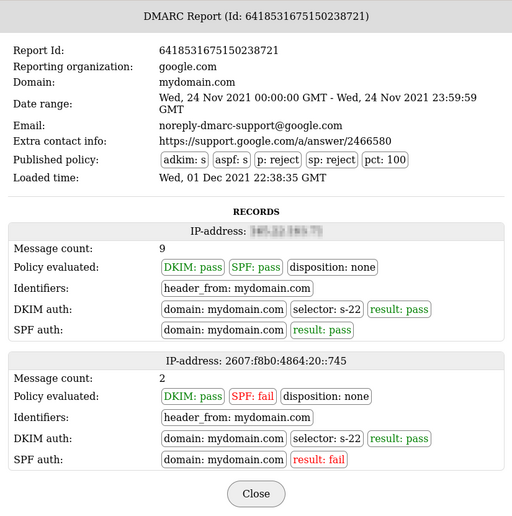
dmarc-srg is a php parser, viewer and summary report generator for incoming DMARC reports. It works by retrieving the reports via IMAP from a specific mailbox and by storing the data in a MySQL/MariaDB database. You can also load XML reports manually or load them from a specific directory.
- MariaDB or MySQL
- PHP 8.1 or higher
php-mbstring,php-mysql,php-xml,php-zip, andphp-jsonImapEngine(works viacomposer)
Setup
The DMARC data are saved to MySQL database. Login as root user to the MariaDB/MySQL server using the shell (mysql -u root -p) and create the database and a new user called dmarc for the new database:
CREATE database dmarc;
GRANT all on dmarc.* to dmarc@localhost identified by 'new_user_password';
Change directory to where is your apache document root (/var/www/htdocs for instance) and download the package. At the moment I'm writing this article the latest code is in a pre-release status, so we have to download the main branch from github:
git clone https://github.com/liuch/dmarc-srg.git
chown -R apache:apache dmarc-srg
Setup an apache virtual domain, for example:
<VirtualHost *:443>
 Include ${SSL_STUFF}

 ServerName  dmarc.domain.tld

 CustomLog ${LOGDIR}/dmarc.log combined
 ErrorLog  ${LOGDIR}/dmarc_error.log

 DocumentRoot ${HTDOCS}/dmarc-srg/public
 <Directory   ${HTDOCS}/dmarc-srg/public>
    Require all granted
    AllowOverride All
 </Directory>
</VirtualHost>
Note that the only directory exposed to the web is dmarc-srg/public.
Create the config file:
cd dmarc-srg
cp config/conf.sample.php config/conf.php
chmod 640 config/conf.php
Edit conf.php and set a global password to protect the access from the web:
$admin = [
   // Set this value to null or remove this parameter to disable authentication
   // Note: The authentication always fails with an empty string password. Change it if you want to use the web>
   'password' => 'secret_pwd'
];
Add the MySQL/MariaDB credentials:
// Settings for accessing the database where reports will be saved
$database = [
   'host'         => 'localhost', // You can use a domain name here
   'type'         => 'mysql',
   'name'         => 'dmarc',
   'user'         => 'dmarc',
   'password'     => 'secret_pwd',

   'table_prefix' => ''
];
Now set up the mailbox which receives your DMARC reports. It is the one that you have in your DNS, dmarc@domain.tld in the following example:
v=DMARC1;p=reject;sp=none;pct=100;rua=mailto:dmarc@domain.tld
Set up a dmarc@domain.tld mailbox like this:
/**
* It is only required if you want to get reports from a mailbox automatically.
* In order to collect reports from several mailboxes, you should put each
* mailbox settings in an array.
*/
$mailboxes = [
   // Just for displaying in the web-admin and utilities. Not necessary.
   'name'            => 'dmarc@domain.tld',
   // Host of the email server. You can specify a port separated by a colon.
   'host'            => 'localhost:143',
   // Connection encryption method. The valid values are:
   // 'none'     - without encryption (strongly not recommend).
   // 'ssl'      - SSL/TLS on a separate port, for IMAP it is usually port 993. Default value.
   // 'starttls' - STARTTLS method, usually on the standard IMAP port 143.
   'encryption'      => 'none',
   // Set true if you want to connect to the IMAP server without certificate validation
   //'novalidate-cert' => false,
   // Mailbox user name.
    'username'        => 'dmarc@domain.tld',
   // Mailbox password or OAuth token when the authentication method is 'oauth'.
   'password'        => 'secret_pwd',
   // Authentication method. The valid values are:
   // 'plain' - authentication with username and password. Default value.
   // 'oauth' - OAuth authentication. Pass the token as the password.
   //           Only available with the imap-engine library (see the fetcher->library setting).
   'authentication'  => 'plain',
   // Mailbox name
   'mailbox'         => 'INBOX',
   // IMAP authentication methods to be excluded.
   // For example: 'auth_exclude' => [ 'GSSAPI', 'NTLM' ]
   'auth_exclude'    => []
];
You may want to move the DMARC reports in a particular 'dmarc' mailbox by means of a sieve rule, in this case you have to set
'mailbox' => 'dmarc',
for the mailbox name.
Install all the prerequisites via composer (if you didn't already install composer, have a look here where I shortly explained how to install it).
mkdir vendor
chown -R apache:apache vendor
sudo -u apache composer update
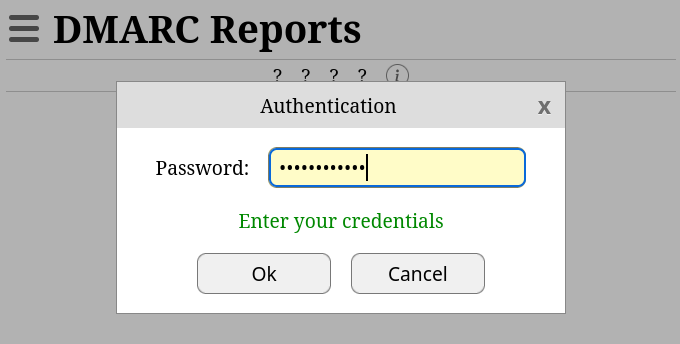
Now browse to https://dmarc.domain.tld (or whatelse) and the database will be initialized at first access.
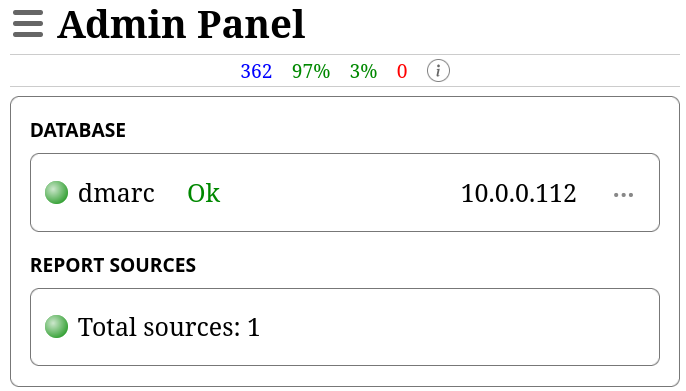
In the sidebar menù, navigate to Administration->Admin Panel to confirm that the database connection is working:
Click over Total Sources and test the access to the dmarc@domain.tld mailbox via IMAP:
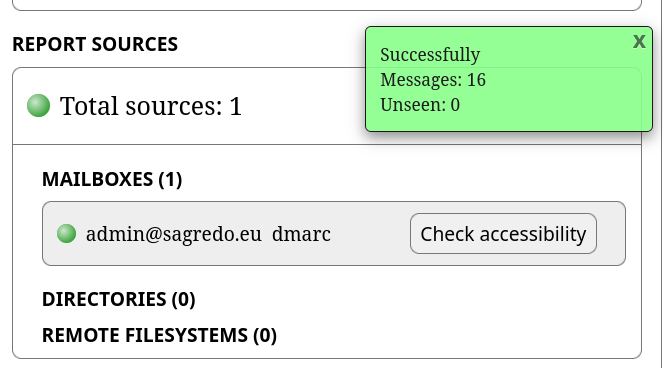
If you get a green box your settings are ok.
Browse to Settings->Domains and add all your domains for which you expect to receive reports.
Finally setup a cronjob to import the DMARC reports into the database during the night. The utils/fetch_reports.php program has to be run by apache:
# dmarc
0 1 * * *  apache /usr/bin/php /var/www/htdocs/dmarc-srg/utils/fetch_reports.php >> /var/log/cron 2>&1
Be aware that only unread email reports will be imported, so, if you ever open one of them and leave that email as read, it will not be imported in the dmarc-srg database.



Comments
invalid regex, subdomain policy
Anonymous March 19, 2021 08:32 CET
Unfortunately, all this is not quite correct.
The regex above does not match:
which is a fine record according to RFC7489.
Also, you will miss separate subdomain policies:
Too bad, I liked the simplicity.
Reply | Permalink
It is not working with SpamAssassin 3.4.0
Martin January 21, 2021 20:05 CET
It is not working with SpamAssassin 3.4.0 (package in Centos 7 for example), because _AUTHORDOMAIN_ is empty. You have to edit source file /usr/share/perl5/vendor_perl/Mail/SpamAssassin/PerMsgStatus.pm ...
Reply | Permalink
It is not working with SpamAssassin 3.4.0
Roberto Puzzanghera Martin January 21, 2021 20:48 CET
Thanks for the advice.
_AUTHORDOMAIN_ not found here on v. 3.4.4 file /usr/local/share/perl5/vendor_perl/Mail/SpamAssassin/PerMsgStatus.pm
Reply | Permalink
SPF Alignment
Lennart January 8, 2021 00:34 CET
DMARC requires not just that SPF passes (i.e. the SMTP FROM is authenticated) but also that SMTP FROM aligns with the From header. After all, DMARC is about authentication of the From header. You should replace SPF_PASS with SPF_PASS && !HEADER_FROM_DIFFERENT_DOMAINS.
Be aware that DMARC often breaks with forwarded email. I would not set the scores as high as yours.
Reply | Permalink
SPF Alignment
Roberto Puzzanghera Lennart January 8, 2021 18:13 CET
Thanks for the contribution.
Actually it's DKIM to break with forwarded email, but in my rule DMARC will pass if DKIM *or* SPF pass, so it will be sufficient that SPF passed to have DMARC passed as well.
Reply | Permalink
SPF Alignment
Lennart Ackermans Roberto Puzzanghera January 8, 2021 19:48 CET
Actually, after checking the DMARC and SPF rfc's (rfc7489 section-4.1, rfc7208.html section-2.4): it is probably better to check for a null SMTP From in Spamassassin and then use SPF_HELO_PASS instead of SPF_PASS. DMARC defers to the SPF rfc in case of a null MAIL FROM (AKA SMTP From). The SPF rfc requires verifiers to check the HELO in case of a null sender. To check for a null SMTP From I think your MTA needs to inject a header (e.g. Return-Path), so Spamassassin can see it. Then you can use something like:
I think the DMARC RFC wants you to check alignment between the HELO and the From header in case of a null SMTP From. I wouldn't do that, since such alignment is uncommon (at least for autoreplies, maybe less so for bounces) and it will always fail with forwarded emails.
The above rule still causes DMARC fails for bounces from servers that haven't configured SPF for their HELO domain. And it will often break for forwarded emails. So I wouldn't assign it a high score. But it is somewhat closer to the DMARC specification, if that is what you're after.
Reply | Permalink
SPF Alignment
Lennart Roberto Puzzanghera January 8, 2021 18:59 CET
That's true in case of your version of the rule, since SPF_PASS checks the SMTP From which in case of forwarded mail is chosen by the forwarding server instead of the original sender. DMARC checks additionally that the SMTP From and the From header are aligned, which always fails for forwarded mail.
Another issue with using SPF_PASS is that it never hits when the SMTP From is null (<>), which is mandatory for autoreplies and bounces. So suppose you receive a forwarded mail (with altered headers such that DKIM breaks) with null SMTP From. Then even if the sender has set up DMARC, SPF and DKIM correctly your DMARC_X rule will hit. So maybe use !SPF_FAIL instead.
But in that case, without !HEADER_FROM_DIFFERENT_DOMAINS the rule will hardly get any hits, since nowadays almost no mail fails SPF, including spam. But with !HEADER_FROM_DIFFERENT_DOMAINS forwarding could fail both DKIM and SPF/alignment.
I don't think there is a good solution, at least not until everyone has implemented DKIM and forwarders stopped messing with headers. Hence, I would never use high scores with DKIM/DMARC rules.
Reply | Permalink
SPF Alignment
Roberto Puzzanghera Lennart January 8, 2021 19:35 CET
Thank you. I'll have something to read in the following days :-)
Reply | Permalink
Incorrect rejections
Marcel Veldhuizen October 27, 2020 19:22 CET
I implemented these rules a couple of weeks ago. I've been noticing some legitimate mail in my spam box, which led me to investigate.
According to the specifications of the relevant standards, it's allowed to implement SPF and DMARC, but not DKIM.
However, your example rule gives these types of emails a score of 10:
To allow mails with only SPF and DMARC to be delivered, I think the expression should be like this instead:
Reply | Permalink
Incorrect rejections
Roberto Puzzanghera Marcel Veldhuizen October 28, 2020 12:03 CET
I had a look to RFC7489#section-6.6.2 and it actually suggests that the DMARC test should pass if <<"one or more" of the Authenticated Identifiers align with the From domain>> so I'm going to accept your observation.
Perhaps it's even more correct to leave things as originally suggested by Iulian
so that the emails will be accepted if at least one between DKIM and SPF pass.
Reply | Permalink
Incorrect rejections
Roberto Puzzanghera Marcel Veldhuizen October 27, 2020 19:45 CET
I think your suggestion is correct. Let me check the rfc in detail before correcting the rule.
Your rule should also prevent that the email will be rejected when for any reason the dkim record was not retrieved. There is a discussion on Iulian's blog (the guy who suggested that rule) on the purpose...
Reply | Permalink
Invalid syntax
A F September 1, 2020 23:12 CET
this check is invalid, this -OR- logic in the () reads:
if not (DKIM_VALID_AU -OR- SPF_PASS) AND theres a policy for the domain then reject which means an email with assuming a policy exists (1):
if no policy exists (0) we are always NO ACTION (GOOD)
Basically its not failing out and runing the domain's policy for a failure of individual parts.
Test with a quick perl script (play with the 3 variables up top):
The following will actually work (tested for all cases):
if not (DKIM_VALID_AU -AND- SPF_PASS) AND theres a policy for the domain then REJECT
Validate by changing that perl script logic to match:
If any of the conditions are 0 (fail) then the policy is enforced. If everything checks out its ignored. No policy means no action.
Thanks so much for the information about how to set the DMARC check up via AskDNS. Hopefully this correction helps make this method even better.
Reply | Permalink
Invalid syntax
Roberto Puzzanghera A F September 2, 2020 15:36 CET
Thank you, fixed
Reply | Permalink